Someone stole my Len!

Someone on snapchat copied my lens exactly and I hand drew it myself and she is taking all the credit for it and claiming it as her own. Ive reached out to snapchat and many people have reported it but nothing is being done about it. She has a public profile and is a bigger creator than me and probably figured I wouldn't know. She even copied the lens cover that's how I found it because I clicked on it thinking it was mine. Please do something about this snapchat!!!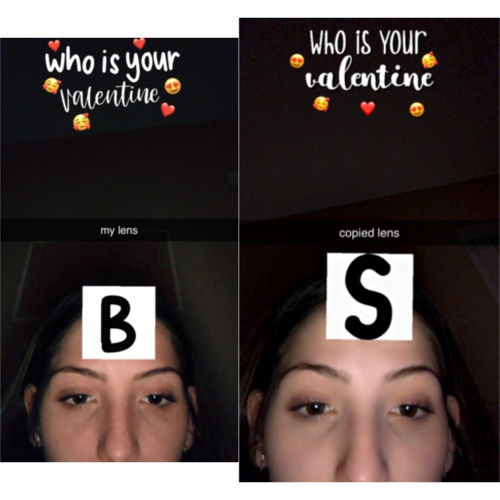 please tell me you can see its identical. she didnt even try to change it up...

Hey saraeduran
Im really sorry to hear this. I hope the other lens creator deletes the lens if she/he sees it. I can see that its mostly identical, but there is still another font used and the smileys are arranged differently. I guess thats why it wasnt taken down yet, as there still some variations. But i can comprehend what you mean as the style and the preview is completly identical.
If its you or a friend on the preview, you can try to report it again, as the other lens creator used your image without permission.
But apart from this, its a simple lettering and i dont think that especially can be somehow copyrighted.
I could be also wrong, so if anyone else knows more about this, please correct me and let me know.
Cheers,
SirQu3ntin
HI,
Last time i talked to snapchat about similiar situation, they recommended me to fill out this form.
https://support.snapchat.com/en-US/co/report-copyright
Have you sent in a report via there?