The forum on this site is closed for new comments and posts. Continue the conversation in our Snap AR Discord server.

Help in building and how tos

  • Hey Eshaan, 


    So your going to want to get started by using the app Blender.  It's a 3d modeling tool that allows you to build and sculpt models.  The app is free and you can find plenty of tutorials online on how to create your models.  In terms of Lens Studio, the best templates you can bring your models into would be static object or the portal template depending on the look your going for!


    Happy Creating,

    Ryan 


    Comment actions Permalink
  • Hey @...

    Maybe some of the following links can help you.

    School Modeling 1

    Modeling 2


    Cheers,

    SirQu3ntin

    Comment actions Permalink
  • Thank you soo much guys, this has really helped me a lot. I am sure I will be able to start with my work now.

    Comment actions Permalink
  • Could you please also help me with this? 

    Location - https://www.google.co.in/maps/@18.5658416,73.907933,185m/data=!3m1!1e3

    This is how the campus looks
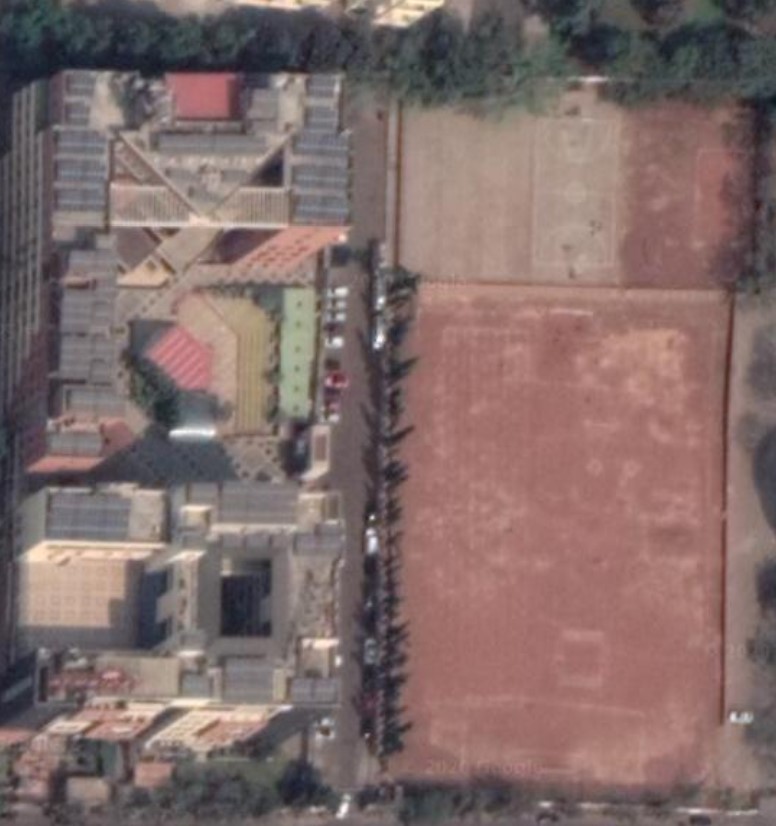
     

    Can you tell me how will i be able to make a diagram of the whole, I will be trying this for the first time.

    Comment actions Permalink
  • Hey @...

    Maybe this will help you.

    You can just download the google maps file and import into blender. Its kinda complicated but easier than modeling it for yourself.

    Click here for the tutorial.


    Cheers,

    SirQu3ntin

    Comment actions Permalink
  • Hey SirQu3ntin


    Well, I did look into what you suggested but when I saw it on Google Maps, the campus does not have a 3D  Model available. Do you think anything else is possible?

    Really appreciate your help, thank you so much.

    Comment actions Permalink
  • Hey @...

    I have watched several videos and tried to do it with google earth. But it seems like there is no 3D- Model of you school there. Last option is that  you have to model it but that would kinda difficult. 


    Cheers,

    SirQu3ntin

    Comment actions Permalink

We're here to help! We just need a little bit of information...

What system are you using?

Have you downloaded the latest version of Lens Studio?

Please download the latest version of Lens Studio. If you still run into this issue, please come back and report it!

Is this issue causing Lens Studio to crash?

What system do you run Lens Studio on?

Version

Graphics

Follow the next steps to help us solve your issue:

  • Copy and paste this text into your TerminalCommand Window
    open ~/Library/Preferences/Snap/Lens\ Studio/ %LOCALAPPDATA%\Snap\Lens Studio Copy Text
  • Press ReturnEnter to run the command. The Lens Studio folder will automatically open
  • Prepare to upload your files: zip the "Log" Folder by right-clicking and choosing "compress."
    Locate the Log.txt file right above it.

    Attach a screenshot of the issue:

Name:

Email:

What is this most relevant to?

Please enter a brief description of your issue:

Thanks for submitting this issue.

Unfortunately, it's likely due to the operating system or hardware you're using – since they don't meet the system requirements for Lens Studio.

Still, we hear you loud and clear, and are logging the issue in case there's ever a workaround we can provide!

Minimum Requirements

Operating System: Windows 10 (64 bit); MacOS 10.11+

Hardware: Minimum of Intel Core i3 2.5Ghz or AMD Phenom II 2.6Ghz with 4 GB RAM; Intel HD Graphics 4000 / Nvidia GeForce 710 / AMD Radeon HD 6450 or better; screen resolution of 1280x768 or higher

We'll try to resolve this issue as soon as possible. Thanks for letting us know about it!

Keep an eye out for a followup email from us. We may have a couple more questions for you, or we might already have a solution to offer.

Happy creating!