Multiple Paper Head templates?

Hello,
I've been trying to use the Paper Head template to make multiple characters where you tap to go to the next one. However, when I duplicate the template funky things happen and I'm not sure how to edit the script to make it work correctly. I'm only using the template for the mouth feature.
This is the link for the lens which shows the issues with the mouth that I'm having (Pig2 and Pig3 mouths get "stuck"). I should note that in that version, I had Pig 2 and 3's Paper Head controller script set to "Lens Turned On" because for some reason, that makes the Wolf and Pig 1 work correctly. Otherwise when they are "Initialized," the wolf's mouth becomes huge and the pigs have missing image icons on its face.
Also, it's meant to be used with Snap Camera only, hence the weird button placements. I also noticed with testing on Snapchat that the wolf's mouth is wonky but on Snap Camera the wolf is fine.
I'm basically done with this project but this one issue keeps me from finishing this.

How are you changing between the mouths?
I've duplicated the controller script object in each character to change the mouths.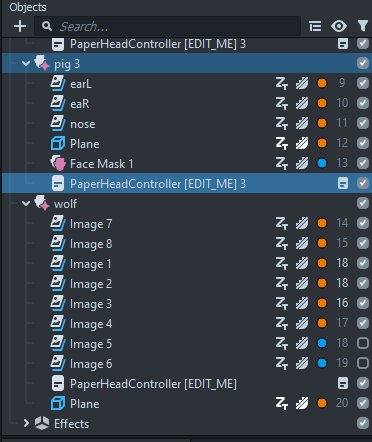
I found a semi-fix to my problem where someone told me to duplicate the controller script in the objects as well. This does fix the problem since the other pig mouths dont get stuck anymore (Atleast I think so, since somehow in the Lens Studio preview the mouth looks different than it does on Snap Camera and Snapchat for this project... I'm still waiting on the lens to get approved to test the link on Snap Camera). However, I do notice that if I change values on any controller object, the other mouths also correspond to that change even though the values in their controller objects don't actually change. This isnt a big problem for my project though but I feel I dont have a true fix either.
Very cool lens already, i hope you find a solution :/ I tried to find a solution for this but unfortunetly i couldnt find anything
Marina I tried changing the PaperHeadController script to allow to change textures and came up with this, bit of a hack around, see if this works for what you're trying to do. https://drive.google.com/file/d/1U8-xgoZgItce6raQ7FiwvszX5yjOiGKG/view?usp=sharing
Thank you Martin!!!!!!! This actually helped my issues a lot. When I thought I founded a fix in my previous post turned out not to actually work. But, I integrated your script and it works nicely.
Thank you so much for your time in helping me!
No problem, your lens looks great!