racist spam reporting

I had 6 lenses taken down just yesterday the majority months old and non offensive, this was super random and I recognized it as spam reporting so I posted about it on my story, some one answered, 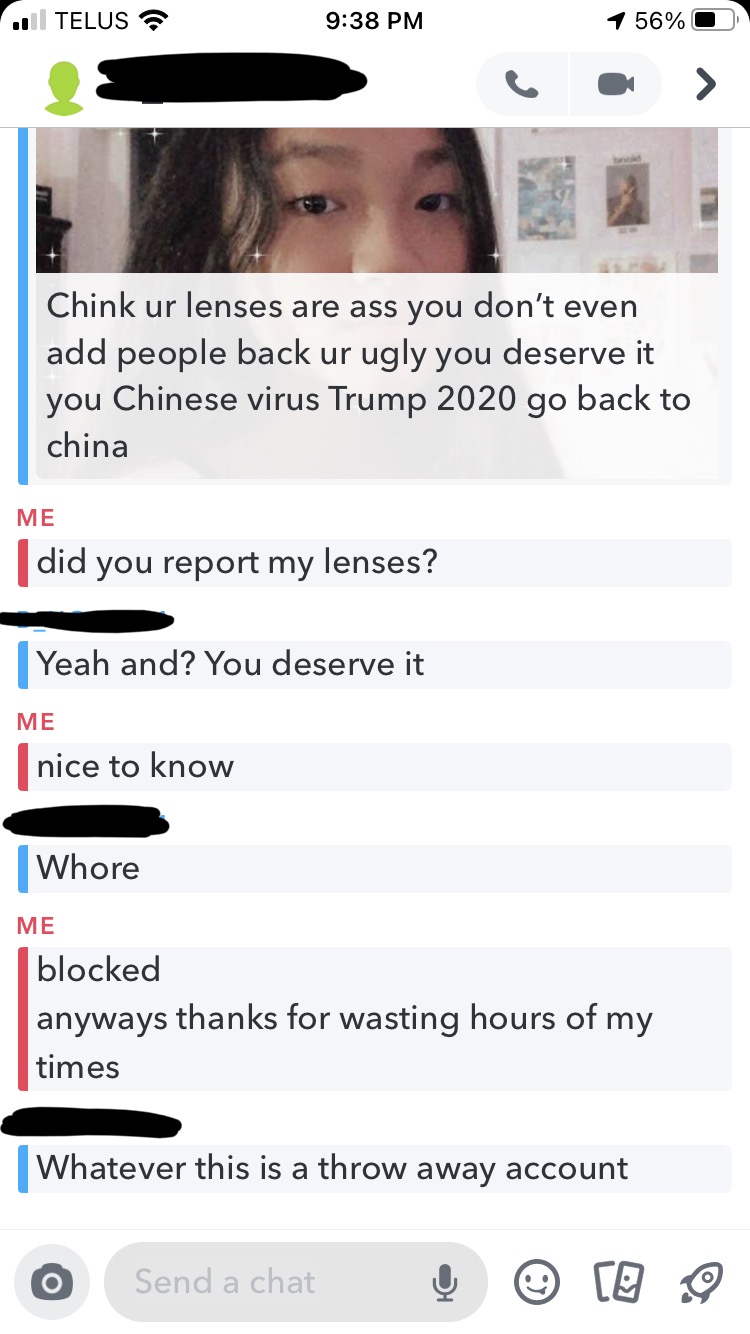
I find it idiotic that someone random can report anyones lenses and get them taken down instantly.
I have emailed multiple people at snapchat with no answer. I'd really appreciate my lenses back and I have no idea how long this has been occurring since they weren't in my recent friend requests. This might have been occurring for weeks as lenses have been taken down for seemingly zero reason for the past few weeks.
These incidents are widespread and have occurred to lens creators I know. The reporting feature needs to be fixed because it is harming creators.
thanks for reading - Alice:)

Hi Alice,
That is terrible to hear I am so sorry something definitely needs to be done. If there is a lens reported there should be better checks and balances.
If a lens is reported it should be sent back to "In Review" and ran through the bot detection again to see if it missed anything originally. Only if the lens is reported multiple times by a significant number of *different people* should it be taken down, or sent to a real person to look at the lens and make the final decision on whether or not it should be taken down.
I apologize for the rampant racism and racial slurs you had to deal with, and I'm sure continue to deal with, especially from Americans and their polarized political climate.
If there is anything myself or others can do to help, feel free to reach out.
Again, I'm sorry you had to deal with this and I hope this gets resolved.
Happy lens creating
- Quinn
Hi Quinn
Yes I completely agree, the current system definitely needs an update and what you're proposing seems like a great idea.
I hope someone at snap sees this and fixes the issues!
-Alice
I also agree with you guys! Would be nice if those lenses get double checked before getting rejected.
Cheers,
SirQu3ntin
Hey alice.atz,
I'm opening a ticket so we can take a look at this. Expect an e-mail from Zendesk requesting your Lens IDs.
Cheers,
Vincent