[Tutorial] Splitting Face Mesh

In this tutorial, I will be showing you how to make a splitting face mesh lens like this one
Lens: https://www.snapchat.com/unlock/?type=SNAPCODE&uuid=4f5d95f123e6424b8d47d47cef61d0d3&metadata=01
The first thing you are going to want to do is open your photo editing app, mine is photoshop, and either create or drag in a white square. You will want to set your select tool up so that you can select 4 squares within your original white square, select the square and delete the other remaining section. Your photo should look like this.

Lable this one Top Left, then do the same for each of the other corners. Once done open lens studio and create 4 face meshes, then duplicate the face mesh default materials 3 times so you have a material for each face mesh. Put the respective materials in the respective face meshes. Drag your 4 photos in and place each one in the materials base texture, be sure to make sure your material looks like mine below. Do this for all four meshes.

Our face mesh is now complete, now in order to make it split, we must use tweens. Hit the plus in the objects panel and select tween manager and delete everything under the tween manager-script. Next click on your first face mesh, go to the bottom of the inspector panel hit add component, script, add script, and select tween manager. Set your tween name to top left, loop type to ping pong once. Do this for each mesh changing the tween name to the correct mesh. Then go back and make sure your movement is as follows for each mesh starting with top left.
Top Left:
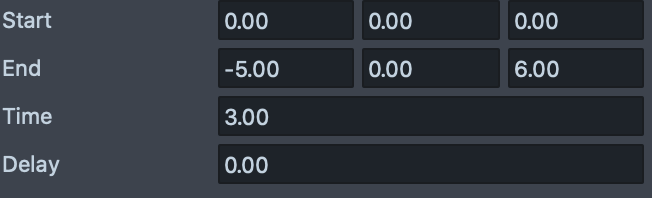
Top Right:

Bottom Left:
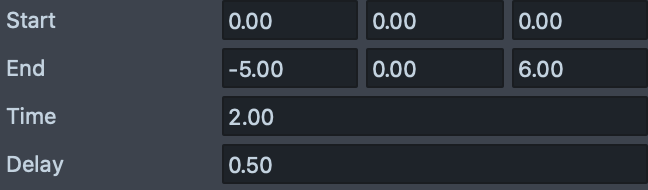
Bottom Right:
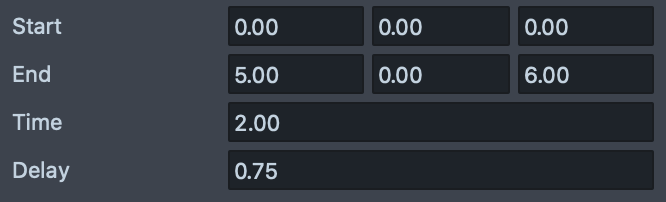
Once done with this we can add four behavior scripts into the objects panel. Set the trigger to face event, event type to mouth open, response type to run tween, target layer to your first face mesh, the tween name to topleft, and the action to start. Do this for each behavior making sure to change topleft to the appropriate tween name. The behavior script should look like this.

There you are! You now have an opening face mesh!
Happy Creating,
Ryan Shields

Check out Ben K's youtube channel to find out how to make the glitter! Check in the pinned in general!
Nice looks cool the end result!!
Looks great, I will apply the lesson, thanks Ryan Shields
Very cool!
Cheers,
SirQu3ntin
Thank you dear for the help i was looking for very long time.