Help me i got a question?

alright so I'm already familiar with lens studio and at an intermediate level of understanding and making, so I'm just a little confused on one of the new templates how can I or we or anyone carry on the face expression template and change it to their own mesh and does it have to be rigged. like what exactly was done to get movements

and I previously posted about something about this but could never get a rigged model to work in lens studio is this glitch fixed?

Hi Itzjustsamuel,
Yes, you're correct, you'll need to bring in a 3D model with blendshapes. What this feature does is it provides you with information about a user face expression. This template then hooks up that value to your face expression! Take a look at https://lensstudio.snapchat.com/api/classes/Expressions/ to see what values face expressions can track.
Hmm can you try importing it to see if you're still having issues? If you are, please let us know and we can help take a look.
Thank you!
Jonathan
Hey Jonathan
You said something about blend shapes, could an alternative like shape keys work as well? and thanks for the help will be looking more into this even if it takes me months!
:)
and yes I got the 3D Models to work I needed to animate it first then when importing it into Lens Studio remove the Animated Mixer.
Hello Itzjustsamuel!
Shape keys in Blender works the exact same way as Blendshapes in Cinema4D or other 3D softwares.
What you'd do is to setup your shape keys in Blender and name it accordingly:
Then import the model to Lens Studio, the Blendshapes option should be an option automatically popping up in the Inspector:
And after that you can link this property with script just like what the Face Expression template did.
Best of luck in creating fun lenses!
Nico
Hello Nico S Jonathan Solichin
could i get some help PLEASE! I've been looking for an answer for a while about this issue on face expression. It doesn't work as it should be even thou the model include 51 bland shapes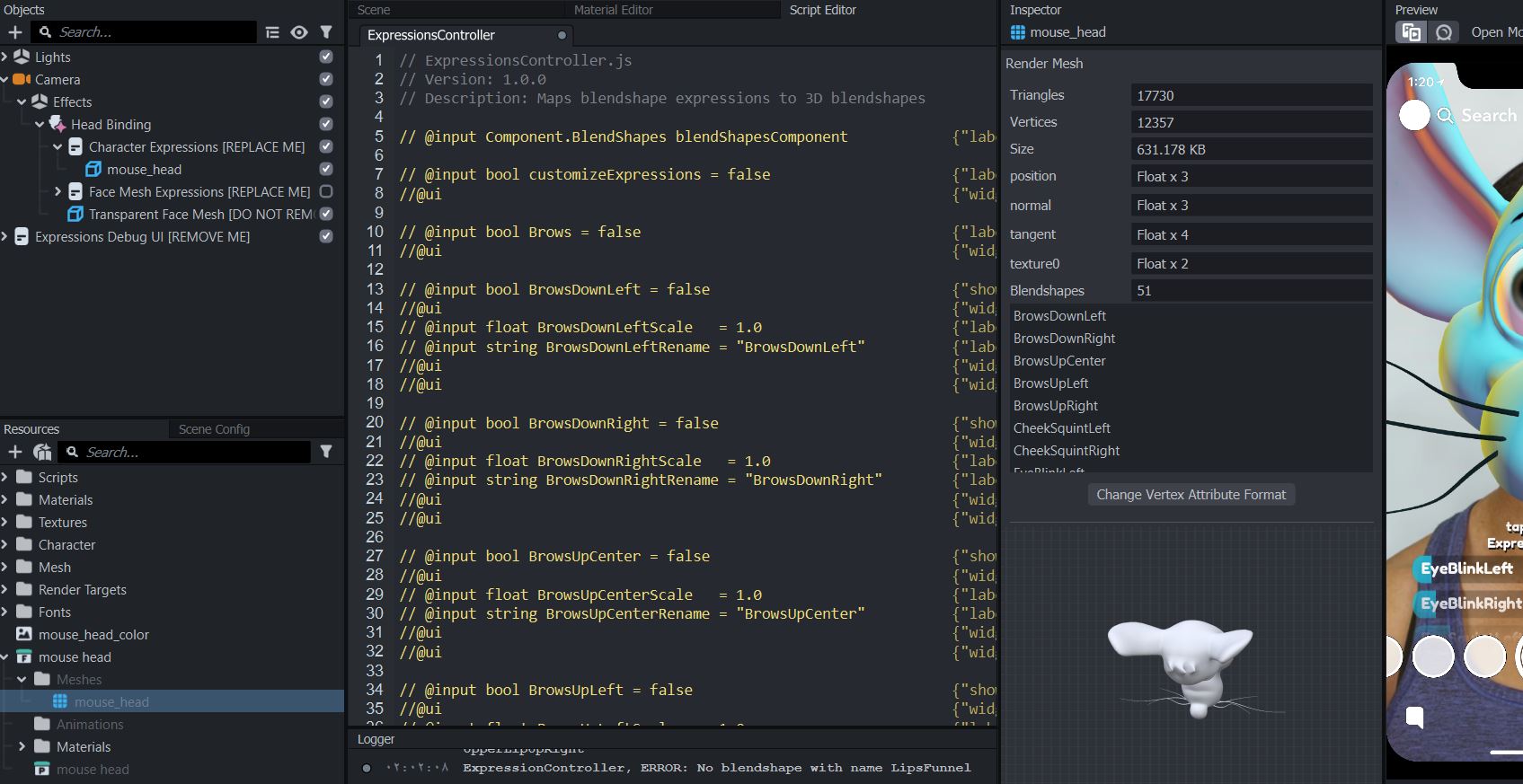
Hi Wolf
I saw in your logger it says 'No Blendshape with name LipsFunnel', did you make sure your model has the LipsFunnel Blendshape component?
In the template you can find all the Blendshape component on the Character Face object, make sure to have the same components with the exact same names in your mesh as well.
Please let me know if this solves your problem, or is the problem coming from somewhere else. Thanks!
Good luck creating X)
Hello Nico S
will i do have all the 51 shape keys they just works fine and i can manipulate with but when its live nothings moves .