Animation Optimizes even when "Optimize Animation" is unchecked?

Hi all,
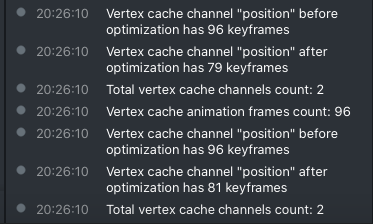
When importing my .fbx with PLA into Lens Studio, one of the import options is "Optimize Animation Curve", which is usually a good setting to have on for simple movements. However, I noticed that it occasionally gets things wrong, and messes up faster animations– currently in my case, a character blinking. So, I figured I would just re-import with the setting off, but nothing changes. In fact, when looking in the console (pic below), it's reveals that it is definitely still reducing keys. Is this a known issue?

Try importing in another format if not it's probably just your model. This happened to me a couple of times where lens Studio would try to optimize my designs and it wouldn't work the same.But don't mess with any of the settings when you import it in just press allow and that's all
Hey Renolve,
Can you please share your FBX + PLA file so we can check on the problem?
What I suggest you to do is if you have Maya, try to import your FBX into maya and then re export from Maya. This might solve some of the problems with importing.
Please let me know.
Cheers,
Amir,