Asset Filesize Inspector to solve "This lens is invalid"

Please add an Asset Usage & Filesize inspector/panel to Lens Studio.
Background
Last night I tried to upload a lens for client inspection. It clocked in at about 5.5 MB. Definitely too big to go live on Snapchat, but not so big that clients shouldn't be able to download and preview. When I tried to upload it, I got the infamous "This lens is invalid" error. Unfortunately, I had no easy way of knowing if there was an easy way to reduce filesize for upload.
To solve the problem, I ended up downloading WinDirStat so that I could analyze filesize in my project directory. I found I had lots of large files I was no longer using, but after deleting them: there was no change in my Lens size. "Alright, the filesize must be based on which elements are being used in the lens." So I then clicked through every texture and file in my project (there are dozens) in order to find any that were conspicuously large. Eventually, I found a couple normal maps I could live without and deleted them. About 40 minutes after I started, I was able to successfully upload.
There's got to be a better way...
Idea
In fact: there is!
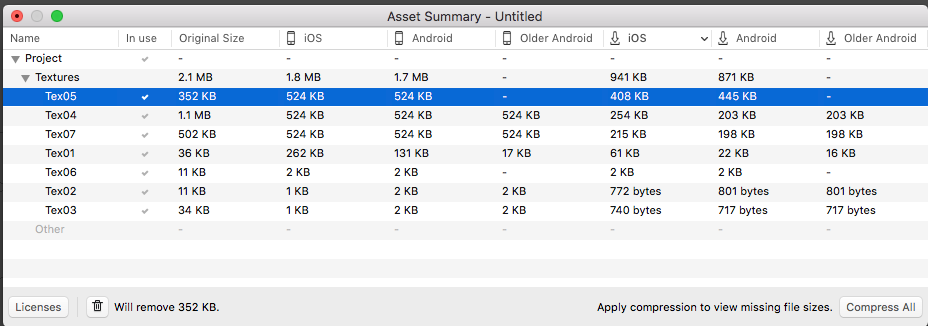
Please add an Inspector that:
- Lists all files in a project (Images, Music/SFX, Meshes).
- Shows the raw file size, and the "download" size
- Lists whether or not an asset is in use in the lens (so we can delete unused assets)
- Can be sorted by Filesize, Type, and Name (so we can easily identify large files)
- Reveal in Resources Panel: Command that reveals asset in the Resources panel.
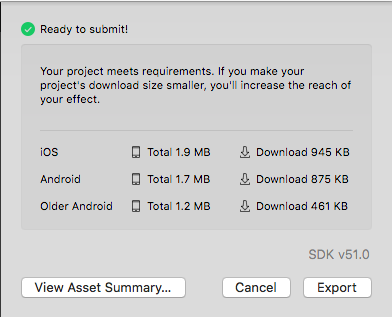
Forgive me for posting a screenshot of the competition, but I think it's germane:
Additional Ideas
These are related but less critical ideas:
- Reveal in Project Command: Selects all objects/materials that make use of the selected asset.
- Reveal in Finder: Opens a finder window showing the asset (helpful if you want to recompress the files)
- Delete: Deletes the selected element
- Total Lens Size: Give a live-updating value of what the export/publish size will be so we can easily know the impact of our changes.
Related Ideas
- Have Lens Studio Compress Textures (so that we can work with full-res assets and only compress as-needed at the end)
- Idea: An option to compress the file to 4MB in LensStudio
