Lens Studio wont open - no error thrown

I am trying to get lens studio running on my mid 2012 mac pro tower, and the app wont open at all. When I click on the icon in my dock, it bounces once and then never opens the app. No error message or anything. Just wont open. Same behavior if I try to open it from the applications folder. Here's a screenshot of my system specs:
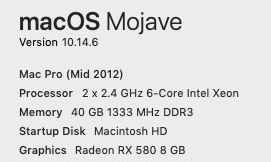
Any idea what I can do to get this working?

System Requirements
It looks like you have all of the minimum requirements to run Lens Studio, however the issue may be with your storage.
My friend had a similar issue that was due to her not having enough storage on her device. As much as I love Lens Studio, I have to say it is due for some optimization.
Try deleting or moving a few files on your computer to an external drive (or maybe more than a few)
This solved my friend's issue after they deleted around five files.
Hey Cameron Foxly,
Make sure you have the latest update from Lensstudio and maybe try to open it as administrator.
It may help, but i would firstly try the tip from furgfury12 by deleting some files from your computer so the program has enough space. :)