different action with different touch zone

Hi everyone,
I'd like to know how can I launch different animation after touching different button (button 1 => action 1 // button 2 => action 2)
like the exemple below https://forbusiness.snapchat.com/l/fr-fr/creative-spotlight//olay-amazon//olay-amazon
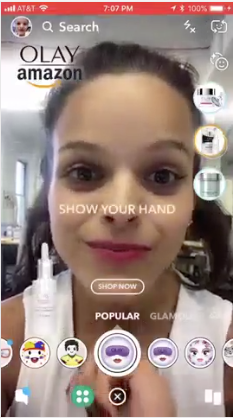
Thx
Cyrielle

Hi Cyrielle!
Have you seen the Soundboard template? It's similar to what you want where there are a couple buttons that users can click on, and each of them plays a different sound and animation: https://lensstudio.zendesk.com/hc/en-us/community/posts/360001319423-The-Soundboard-Template-Try-It-
Alternatively, you can create your own solution by using a billboard and a touch component.
First, create a billboard to display your button:
Then, in the Inspector panel, you can choose the image for your button:
Then, at the bottom of the Inspector panel, add a new Touch component:
Since our billboard is showing in the orthographic camera, we can fill out the component like this:
Finally, we can add a script to do our action. Also in the Inspector panel of the sprite, add a new Script component:
Then, in the new script component, once you've added your script, you can select in the drop down to call the script on Touch Start!
And that's it! your script should be called anytime the user presses on your billboard button!
Let me know if you need any clarification :) Can't wait to see what you come up with!
Cheers,
Jonathan
My final scene looks something like this:
Thx a lot, it really helps and save me !!! :)